Your first GUI
nexium-gui is an immediate-mode toolkit written in Nexium: a software rasterizer drawing into a framebuffer, a bitmap font, layout and widgets, with about two hundred lines of C to open a window and blit. It ships with the repository under gui/, and this is a counter written with it.
// The Topo's first GUI: a counter with a button, a slider and a text field.
//
//     nx run gui/counter.nx                    a window
//     nx run gui/counter.nx -- --shot out.ppm  one frame, drawn offscreen, saved

import nexium_gui

fn main() -> !void {
    let args = os.args()
    let shot = args.len > 2 and args[1] == "--shot"
    var ui = nexium_gui.Ui.headless(360, 220)
    if !shot {
        ui = nexium_gui.Ui.open(@cstr("counter"), 360, 220) orelse {
            eprintln("could not open a window", .{})
            return
        }
    }

    // the application's state is just variables; the widgets read and write them
    var count: i32 = 0
    var step: f32 = 1.0
    var name = String.from("climber")

    while ui.begin_frame() {
        ui.heading(format("hello, {}", .{name}))
        _ = ui.text_input(&mut name)
        ui.space(6)
        if ui.button("+") { count += step as i32 }
        ui.same_line()
        if ui.button("-") { count -= step as i32 }
        ui.same_line()
        ui.label(format("count: {}", .{count}))
        _ = ui.slider("step", &mut step, 1.0, 10.0)
        ui.progress((count as f32 / 100.0).min(1.0))
        if shot {
            try ui.canvas.save_ppm(args[2])
            break
        }
        ui.end_frame()
    }
    ui.close()
    if shot { println("wrote {} ({}x{})", .{args[2], ui.canvas.w, ui.canvas.h}) }
}
$ nx run gui/counter.nx # a window
$ nx run gui/counter.nx -- --shot frame.ppm # one frame, drawn offscreen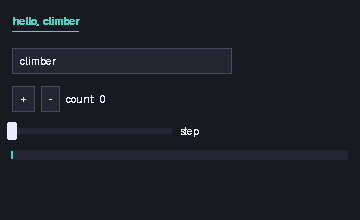
The model#
Widgets are function calls made every frame. ui.button("+") draws a button and returns whether it was clicked this frame; ui.slider("step", &mut step, 1.0, 10.0) draws a slider, writes the new value through the pointer, and returns whether it changed. There is no widget tree to build, no callbacks, no event handlers: the application's state is the application's own variables, and the frame loop reads and writes them.
    while ui.begin_frame() {
        ...
        ui.end_frame()
    }
begin_frame pumps the window's events, resets the layout and clears the canvas, and returns false once the window is closed; end_frame presents the frame. Between the two, the widgets go top to bottom, same_line() puts the next one to the right of the last, space(px) and separator() are the layout.
This suits a language with explicit ownership well: nothing outlives the frame, so nothing is shared, so there is nothing to reference-count or lock. It is the model of egui and Dear ImGui.
Headless#
var ui = nexium_gui.Ui.headless(360, 220)Ui.headless(w, h) is a Ui with a canvas and no window. The program draws one frame into it and saves the canvas with save_ppm, which is how this page has a picture and how the test suite checks the GUI without a display: nx test gui/nexium_gui.nx runs the toolkit's own tests headless, and the harness renders this counter's frame on every run.
Ui.open(title, w, h) returns null on a platform with no backend; the program above falls back to a message. The Win32 backend is in gui/ today; X11, Wayland and Cocoa are on the roadmap (1.5).
What is there#
Widgets: label, dim_label, heading, button, checkbox, slider, text_input, progress, separator, space, panel. Free drawing on ui.canvas: fill_rect, rect, fill_rounded, hline, vline, text, set/get a pixel, with colours as 0x00RRGGBB and helpers rgb, mix, hue_color. Two themes, dark_theme() and light_theme(), and the ui.theme you can edit. The whole of gui/nexium_gui.nx is under a thousand lines and every part of it is ordinary Nexium, which makes it the best next thing to read if you want to write a widget.
The import nexium_gui line finds gui/nexium_gui.nx next to gui/counter.nx; a program elsewhere would use it as a path dependency (chapter 19). artifact link { c_sources = ["platform.c"] } inside the toolkit is what compiles the window layer in, and it says what to link per platform (libs_windows = ["user32", "gdi32"]).
Next: packages.